See BOARD in Action
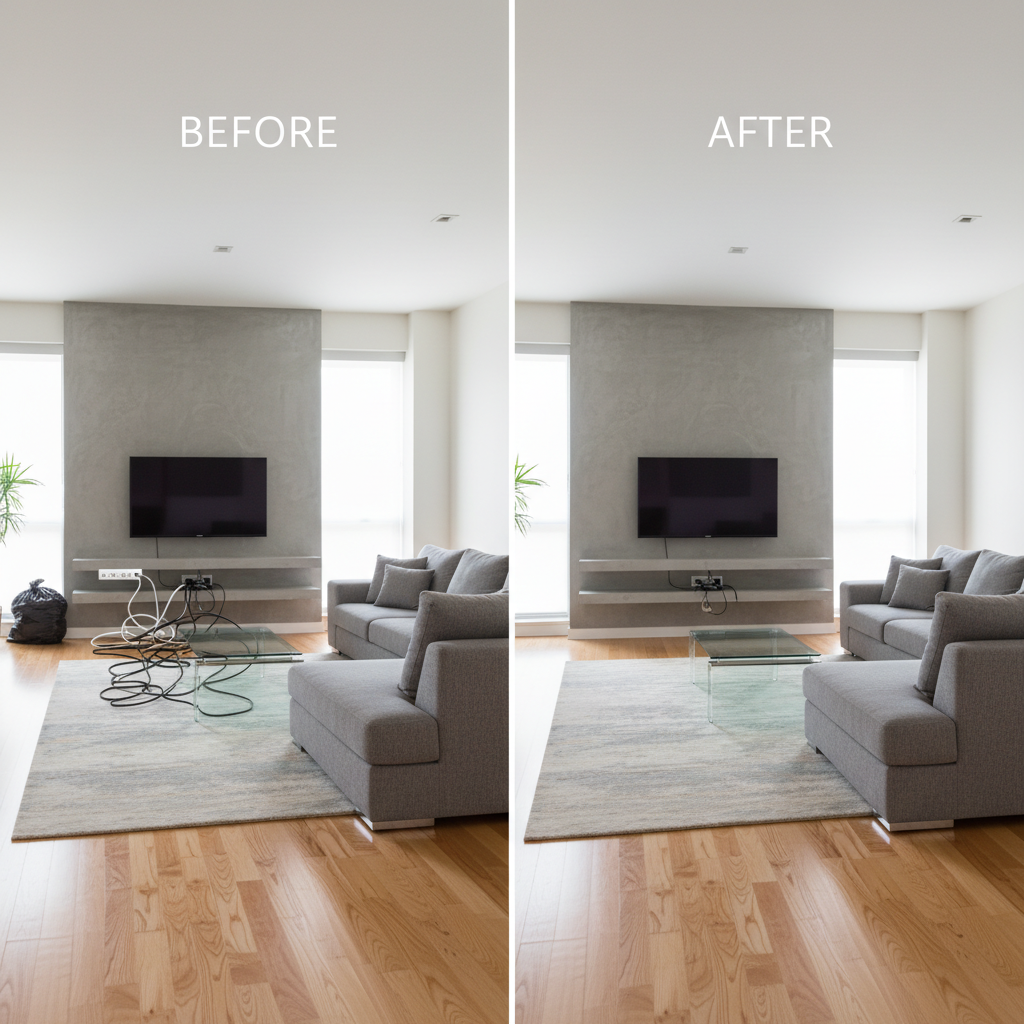
Real results from real photos.

Real Estate Photo Cleanup

Travel Photo Cleanup
BOARD uses artificial intelligence to detect and remove objects from photographs. One click. No skill required. Accessible to everyone.
Real results from real photos.
Real Estate Photo Cleanup
Travel Photo Cleanup
BOARD was designed to be accessible to users of all skill levels. No training or technical knowledge is needed.

Select any image file. BOARD accepts JPG, PNG, WebP, and HEIC formats at resolutions up to 50 megapixels.

Our artificial intelligence system automatically identifies and outlines every distinct object in your photograph.

Click on any detected object to remove it. The AI will reconstruct the background area seamlessly.

Save your edited photograph at full original resolution. No watermarks are applied. No quality is lost.
AI identifies every person, vehicle, animal, sign, and object in your photo with pixel-level precision. No manual selection needed.
Click once on any detected object to remove it from the photo. No brushes, no lasso tools, no masking. The interface is fully accessible.
Advanced inpainting technology fills removed areas with contextually accurate background content, preserving visual coherence.
Edited photographs are exported at the same resolution as the original. No compression is applied. No watermarks are added.
Built with accessibility as a core principle. High contrast interface, large touch targets, keyboard navigation, and screen reader support.
Images are processed in ephemeral memory and automatically deleted upon completion. No user data is collected or stored without consent.
"We adopted BOARD for our entire municipal communications department. The accessibility features and simple interface mean every team member can use it effectively."
"Processing real estate listing photos used to take our team hours. BOARD reduced that to minutes. The AI accuracy is consistent and the results are publication-ready."
"The privacy-first approach is what convinced our compliance team. No data retention, no image storage, full GDPR alignment. The tool itself is also genuinely excellent."
No subscriptions. No recurring charges. Credits do not expire. All features available at every tier.
BOARD uses AI to automatically detect every object in your photo. Click the object you want removed, and the AI reconstructs the background. No manual selection tools required.
Yes. All users receive 5 free credits with no account required. After that, credit packs start at approximately $0.50 per edit. No subscriptions.
BOARD requires no training or skill. No brushes, layers, or masks. AI detects objects automatically. One click completes the removal.
People, animals, vehicles, signs, power lines, trash, furniture, watermarks, and virtually any identifiable object in a photograph.
No. Start immediately with 5 free credits. No account, no personal information collected. Registration is optional for purchasing additional credits.
JPG, PNG, WebP, and HEIC formats at resolutions up to 50 megapixels. All exports are at full original quality with no compression or watermarks.
BOARD is designed to serve professionals across multiple sectors. The following use cases represent the most common and effective applications.
Remove unauthorized vehicles, pedestrians, construction materials, and environmental debris from property listing photographs. Ensure every listing meets professional presentation standards.
Process large volumes of product photographs with consistent quality. Remove background clutter, competing items, and packaging imperfections at scale.
Prepare public-facing imagery for government publications, websites, and social media. Remove unintended visual elements while maintaining document integrity.
No software installation required. BOARD operates in all modern web browsers including Chrome, Firefox, Safari, and Edge. Compatible with all major operating systems.
REST API available for programmatic access. Upload images, specify processing parameters, and retrieve results automatically. Full documentation provided.
All images processed in ephemeral memory. Automatic deletion upon processing completion. No user data stored without explicit consent. Full audit trail available.
99.9% uptime SLA. Redundant infrastructure across multiple regions. Automated failover with zero-downtime deployments. Public status page for transparency.
5 free credits. No account required. No personal information needed. Start editing immediately.
Open BOARD ApplicationAverage savings reported by organizations in first quarter of adoption
Average processing speed compared to manual editing workflows
Images requiring zero manual correction after AI processing
Images stored on servers after processing. All data purged automatically.
BOARD accepts all standard image formats used in professional photography and digital media workflows.
Note: All exported images preserve full original resolution. No compression is applied. No watermarks are added to any output.
* No account required. No personal information collected during free usage tier.