The Smartest Way to
Remove Objects from Photos
AI auto-detects every object in your photo. Click the one you want gone. No brushes, no masks, no Photoshop degree required.
See BOARD in Action
Real results from real photos.

Real Estate Photo Cleanup

Travel Photo Cleanup
From upload to done in seconds
No learning curve. No tutorials. Just four simple steps.

Upload
Drop your photo or paste a URL. JPG, PNG, WebP - all supported.

AI Detects
Our AI identifies every object in the image instantly and automatically.

Click to Remove
Click any detected object. No lasso tool, no brush, no mask needed.
Download
Your clean photo is ready. The background fills in naturally.
Everything you need, beautifully simple
BOARD replaces complex tools with intelligent automation. Here's what makes it different.
Instant Detection
AI auto-detects every object the moment you upload. People, signs, cars, photobombers - all outlined and clickable.
Click, Not Brush
No tedious manual selection. Objects are pre-outlined by AI. Just click the one you want removed.
Natural Fill
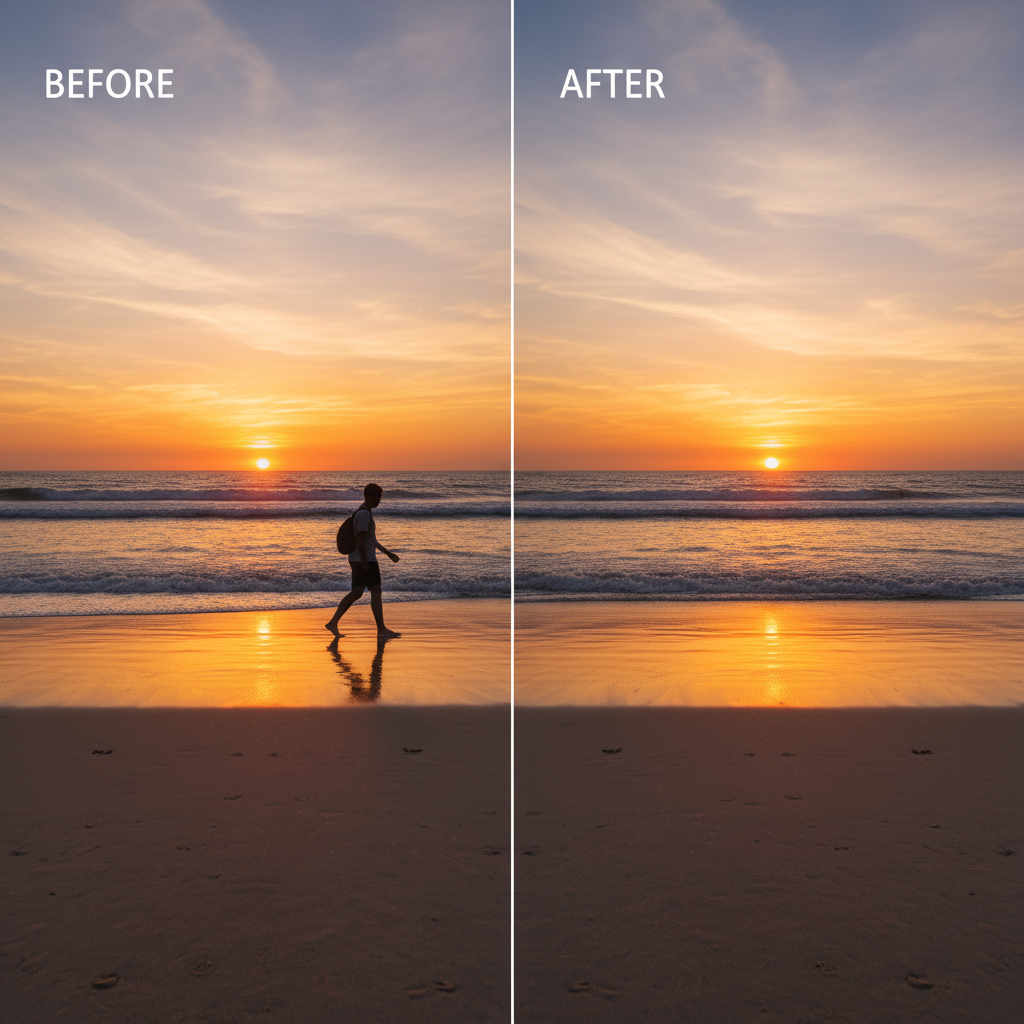
AI reconstructs what was behind the removed object. Textures, lighting, perspective - all preserved.
Works Everywhere
Full functionality in your browser. Desktop, tablet, or phone. No app install required.
Private by Default
Photos are processed and deleted. We never store, train on, or share your images.
Pay Per Edit
No subscriptions. Buy credits when you need them. Start with 5 free edits - no card required.
See the magic happen
How BOARD stacks up
The only editor with AI object detection built in. No manual work required.
| Feature | BOARD | Photoshop | Remove.bg | Cleanup.pics |
|---|---|---|---|---|
| Auto object detection | ✓ | ✕ | ✕ | ✕ |
| One-click removal | ✓ | ✕ | ✕ | ✕ |
| No brush/lasso needed | ✓ | ✕ | ✓ | ✕ |
| Remove any object | ✓ | ✓ | BG only | ✓ |
| No skill required | ✓ | ✕ | ✓ | ✕ |
| Free tier | 5 credits | $22/mo | 1 free | Limited |
Loved by photographers and everyone else
I had a tourist in every single photo from my trip to Italy. BOARD cleaned all 30 photos in under 10 minutes. Absolutely incredible.
As a realtor, I need clean property photos fast. BOARD removes trash cans, cars, power lines - things I used to spend 20 min on in Photoshop.
My ex was in half my family reunion photos. 10 minutes and every photo is perfect. Worth every penny of the credits.
Simple, transparent pricing
No subscriptions. No hidden fees. Credits never expire.
5 credits to try everything
- 5 free object removals
- Full resolution export
- No signup required
- No watermark
~$0.50 per edit
- 30 object removals
- Credits never expire
- Full resolution export
- Priority processing
~$0.40 per edit
- 100 object removals
- Credits never expire
- Full resolution export
- Priority processing
Frequently asked questions
How does BOARD remove objects from photos?
BOARD uses AI to automatically detect every object in your photo. Simply click on the object you want removed, and our AI fills in the background naturally. No manual selection or brushwork needed.
Is BOARD free to use?
Yes! BOARD gives you 5 free credits to start - no signup required. After that, credit packs start at roughly $0.50 per edit.
How is BOARD different from Photoshop?
Photoshop requires manual selection tools, masks, and expertise. BOARD automatically detects objects - you just click the one you want gone. It takes seconds, not minutes.
Can I remove people from photos?
Absolutely. BOARD detects people as individual objects. Click on any person in the photo and they'll be cleanly removed with the background filled in naturally.
Does BOARD work on mobile?
Yes, BOARD works fully in your mobile browser. No app download required. Upload, tap, done.
What photo formats does BOARD support?
BOARD supports JPG, PNG, and WebP formats. Most photos from phones and cameras work perfectly. Maximum file size is 20MB.
Ready to clean up
your photos?
5 free credits. No signup. No credit card. Just upload, click, and download.